Artwork Requirements
File formats, print-area dimensions, and placement standards for every decoration method we offer. Pick a method below to check max print sizes, sleeve placement, pocket dimensions, and hoop sizes before you build your quote.
Screen printing needs true vector art separated by color. We use a non-phthalate color mixing system with enhanced pigment technology for the best saturation available. Choose from 52 stock Pantones, or custom PMS mixing (added fee). Reference a proper PMS Formula Guide when matching — screens and browsers do not show true color.
Four-Color (CMYK) & Simulated Process also accept .jpg and .png at 300 dpi @ full scale resolution.
- All content must be vector, not raster.
- All strokes must be converted to outlines.
- All text must be converted to outlines.
- Photographic elements (e.g. distressing) must be embedded, not linked.
- Art must be sent at actual size, or sizing specified in the purchase order.
- Render colors using Coated PMS colors from our stock list, unless a custom PMS is required.
- Corel Draw users: export to .pdf and review before sending — some art may not translate cleanly.
| Location | Adult Max | Youth Max | Position |
|---|---|---|---|
| Full Front | 13.5 × 15.5" | 9 × 12" | 2.5" down from collar (youth 2") |
| Full Back | 13.5 × 15.5" | 9 × 12" | 3" down (youth 2.5"); hoodies sit lower |
| Small Chest (FLC/RFC) | 3.75 × 3.75" | 3.5 × 3.5" | 2.5" down (youth 2") |
| 3 × 3" | — | Centered over pocket | |
| Yoke | 3 × 3" | — | 1" down from collar |
| Short Sleeve | 3.5 × 4" | 3.5 × 3" | 0.5" up from seam |
| Long Sleeve | 3.5 × 15.5" | 3.5 × 14" | Centered on sleeve |
| Tags | 2.75 × 2.5" | 2.75 × 2.5" | 0.5" down from seam |
Common print areas — may not apply to all garments. Some tolerance is allowed. Hoodies, V-necks, and tanks have different max sizes.
Underlay
A white base for bright, vibrant, contrasting color — even on dark garments.
No Underlay
No white base; duller print and not a true PMS match, especially on darks.
Vintage
A thin, worn-looking print created by cutting back ink flow with no underlay.
Distressing
An aged look created graphically — not a print technique.
Halftone
Varied dots create gradients and shades with only one or two ink colors.
Four-Color Process (CMYK)
Semi-transparent cyan/magenta/yellow/black inks for complex designs on white garments.
Simulated Process
Opaque inks + halftones reproduce highly detailed, vivid graphics on light and dark garments.
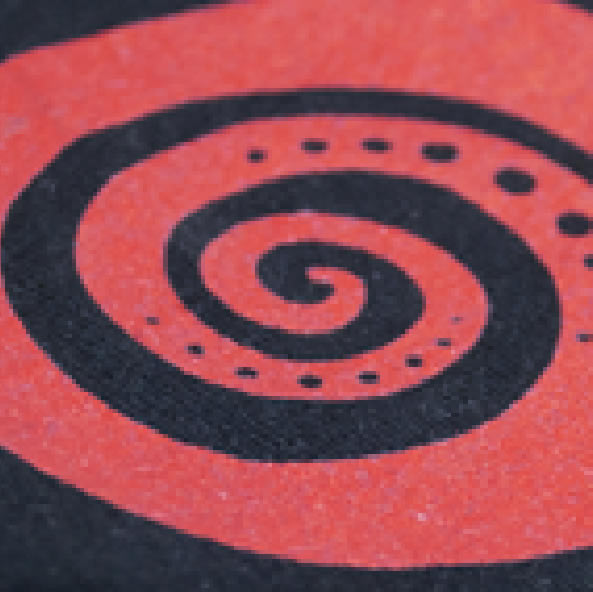
Ink With Underlay
A white base under the ink gives bright, vibrant, contrasting color — a true PMS match even on dark garments.
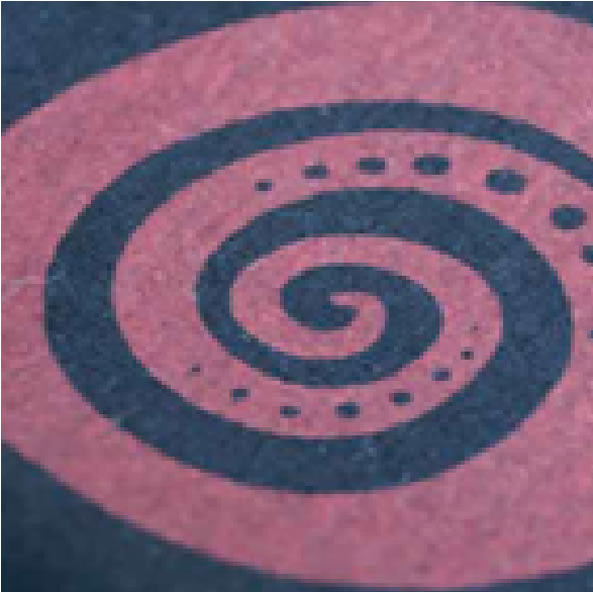
Ink Without Underlay
No white base — a duller print where the ink color is not a true PMS match, especially on darker garments.
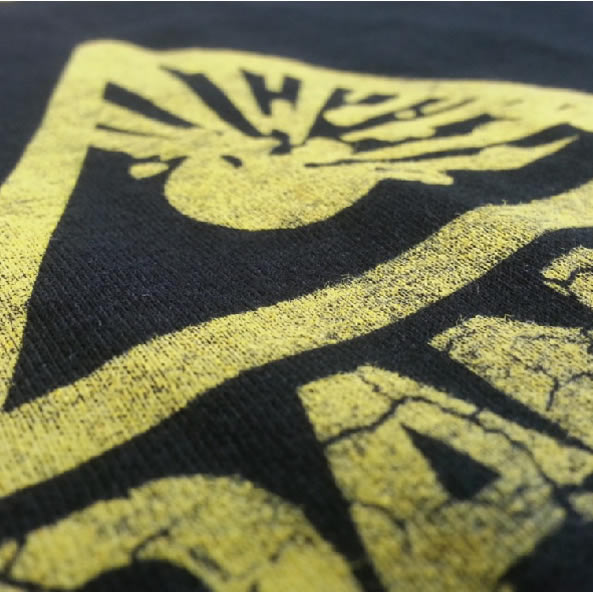
Vintage Print
A thin, worn-looking print created by cutting back ink flow with no underlay.
52 stock Pantones available off the shelf. Any of the 1,867 coated colors in the PANTONE guide can be mixed on our state-of-the-art system for a custom PMS match (added fee).
Browse Our Inks.
52 stock colors ready off the shelf, plus custom PMS mixing from 1,867 coated colors.
Start a Screen Printing quote.
Pick a product, configure your decoration, and get an instant estimate.